Showing posts with label mikrotik. Show all posts

Friday, June 24, 2011

setting dhcp server mikrotik OS

if you don't know setting internet with mikrotik. the first you can visit http://step-technology.blogspot.com/2011/06/setting-internet-with-mikrotik-os.html

if you have known, you can follow the instruction this bellow for dhcp server mikrotik os:

1. we use winbox. select IP---> dhcp server


2. select DHCP setup and then on DHCP Server Interface select local

setting internet with mikrotik os

MikroTik RouterOS is the operating system and software that can be used to make computer manjadi reliable network routers, includes a variety of features designed for IP networks and wireless networks, suitable for use by ISPs and hotspot providers

The following steps so that we can use Mikrotik as a router for internet.

1. The first step we change the name of the ethernet to make it easier to do the configuration settings.


[admin@MikroTik] > interface set ether1 name=public
[admin@MikroTik] > interface set ether2 name=local


2. Setting ip for ethernet

Sunday, May 22, 2011

Load Balance using PCC method in mikrotik


load balancing is to share Internet access via two or more internet connections are balanced (balance), do not have to wait a full connection and then just move to the next connection.


During this time many of us who think wrong, that by using loadbalance two connection lines, the large bandwidth that we'll get double the bandwidth before using loadbalance (accumulation of both the bandwidth). This needs to be clear first, that loadbalance will not add much bandwidth we get, but only served to divide the traffic from both the bandwidth so they can be used in a balanced manner.


With this article, we will prove that the use of mathematical formulas loadbalancing does not like 512 + 256 = 768, but 512 + 256 = 512 + 256, or 512 + 256 = 256 + 256 + 256.


In this article we use RB433UAH with conditions as follows:

  1. Ether1 and ether2 connected to different ISPs with large bandwdith different. ISP1 and ISP2 at 512kbps at 256kbps.
  2. We will use an internal web-proxy and use OpenDNS.
  3. RouterOS you are using version 4.5 because the PCC has become a popular feature at the 3:24 version.


If the above condition is different from the network conditions at your house, then the configuration that we describe here will have to match you with the configuration for the network at your house.


If we have configure like this:

with command in the mikrotik:

/ip address
add address=192.168.101.2/30 interface=ether1
add address=192.168.102.2/30 interface=ether2

mikrotik vlan implementation on RB250GS (Part 2)

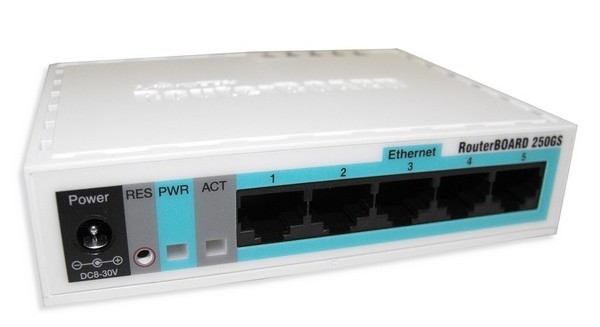
RB250GS

One of the latest Mikrotik products RB250GS is included in a special switch that can implement VLANs on each port. And perhaps the smallest and cheapest manageable switches ever made. In addition to making your network more well organized this small switch may be a means of saving you to recognize and implement VLANs in your network.

Basic VLAN implementation uses RB250GS

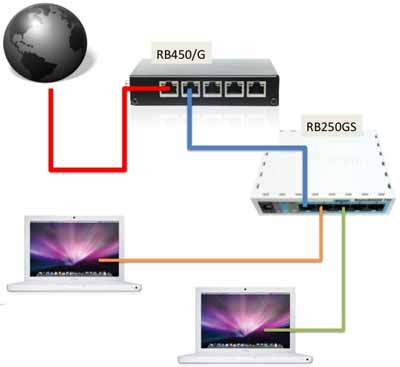
In the chart below is a chart for example implememtasi VLAN networks that can be done by proxy and router products must be integrated with switches mikrotik RB250GS.

Saturday, May 21, 2011

mikrotik vlan implementation on RB250GS (Part 1)


Introduce basic network


LAN
Lan is a local area network that is defined and covered by a network address and broadcast address is the same. You need to remember also that the router device will stop whatever it protocolnya broadcast traffic, but the switch will automatically be forwarded.


VLAN
VLAN is a Virtual LAN is a LAN network that virtually created on a switch. In standard switch usually forwards traffic from one port to all other ports when there is traffic with the same broadcast domain through the port. For the special switches, they are able to make several different LANs with different id in every port, and will only forward traffic to ports that have the same id. Special type switch is actually automatically install VLAN in it (vlan id = 1) which consists of all the existing ports.


Why VLANs are needed ? 

Tuesday, April 26, 2011

how to create user manager mikrotik


If you want to make the internet hotspots that can use the vouchers. each voucher has a username and password. you simply make the operating systems like mikrotik that already exist in RB 450, RB 1100 and other types.
The first step is
1. Create a Radius server
/ radius add service = hotspot address = 127.0.0.1 secret = 123456